How registrations move through the exam process
The Flowchart page illustrates the flow of candidate registrations in a jurisdiction as they move through the NCLEX process.  (This process is described in detail on the following pages.) Use the flowchart to view and edit candidates by their status.
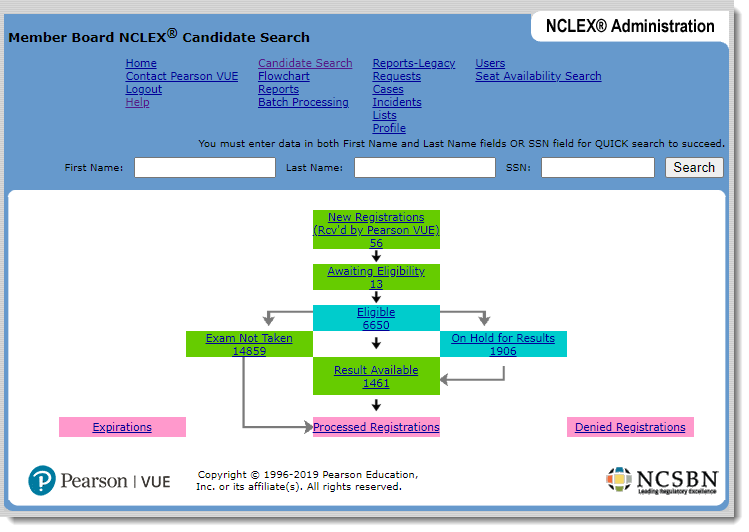
This section describes how registrations move through the exam process.
- Registrations are received by Pearson VUE.
Candidates submit their registrations: by using the NCLEX Candidate website, or by calling NCLEX Candidate Services. When submitting registrations, candidates specify the jurisdiction in which they are seeking licensure/registration.
Display newly-received registrations by selecting the New Registrations status at the top of the diagram shown on the previous page. Typically, you change the status of new registrations to Awaiting Eligibility to move them from the New Registrations Inbox.
- Some candidates request accommodations.
In the process of registering, candidates are instructed in the NCLEX Examination Candidate Bulletin to request any accommodations they require as soon as possible (preferably before registering for the exam). Once you receive a candidate’s accommodations request, add the request(s) to the candidate’s registration using the NCLEX Administration website.
- Mark the registrations as eligible or denied.
Before a candidate can schedule an appointment to take the NCLEX, the Nursing Regulatory Body to which the candidate has applied must mark the registration as eligible.
When you select an NCLEX registration to review, all data from the registration and the candidate’s testing history are available on the Candidate Details and Registration Details pages. If the candidate was ever denied eligibility, information about the denied registration and the denying Nursing Regulatory Body (if available) is displayed in the candidate’s exam history.
After reviewing a registration, mark it as either eligible or ineligible (denied).
- If you mark the registration as Eligible, Pearson VUE automatically generates and sends the candidate an ATT (Authorization to Test) email, which allows him or her to schedule an exam appointment. (The ATT email is sent.)
- If you mark the registration as Denied, the Nursing Regulatory Body is responsible for notifying the candidate; Pearson VUE does not notify candidates that they have been denied eligibility. Denied candidates do not receive a refund if their registrations are marked ineligible. The candidate’s registration remains in the database as a denied registration.
Important points about marking registrations as eligible or denied:
- You can mark registrations with accommodations as eligible any time after entering the accommodations requests. The candidate will not receive his or her ATT email (and cannot schedule an appointment) until all pending accommodations requests have been granted or denied by NCSBN.
- Nursing Regulatory Body users who manage their eligibility offline export all registrations awaiting eligibility to a standard formatted file. After you mark candidate eligibility using your own system, upload the records to the NCLEX Administration website for importing into the Pearson VUE system.
- Candidates schedule appointments and take their exams.
Candidates can schedule exam appointments on the NCLEX Candidate website or by calling NCLEX Candidate Services. They must take their exam within the eligibility dates shown on their ATT email. (Eligibility dates are based on ATT settings in the Nursing Regulatory Body’s profile.)
If, for some reason, a candidate does not take the exam, he or she must start the registration process over again. You can view a list of candidates who did not take their exams by selecting the Exam Not Taken status on the Flowchart page.
- Exam Results are processed and made available.
Typically, the candidate’s exam is quickly scored and his or her status is automatically changed to Result Available. You can view and print exam scores for candidates with a Result Available status at any time.
Occasionally, Pearson VUE places a hold on a candidate’s exam results based on a set of defined rules. When this occurs, a designated person at Pearson VUE investigates the issue and, if necessary, consults with NCSBN. After the issue is resolved, Pearson VUE takes the necessary action, which may involve removing the hold or revoking the results.
- Mark completed registrations as processed.
The Processed Registrations status represents the last step in the registration process. After sending exam results to candidates, you can close the candidates’ registrations to move them to the Processed Registrations status. This step is not required, but doing so regularly prevents the Result Available list from growing increasingly longer.
Pearson VUE Proprietary and Confidential