View eligible registrations
The Eligible Registrations page shows all registrations in your jurisdiction that have been marked eligible, and are awaiting scheduling or taking of the exam, and those that have been made eligible but an ATT email has not been sent because there are unresolved accommodations requests.
Use this page to view the list of eligible registrations.
- Select Eligible on the Flowchart page.
The Eligible Registrations page is displayed. 
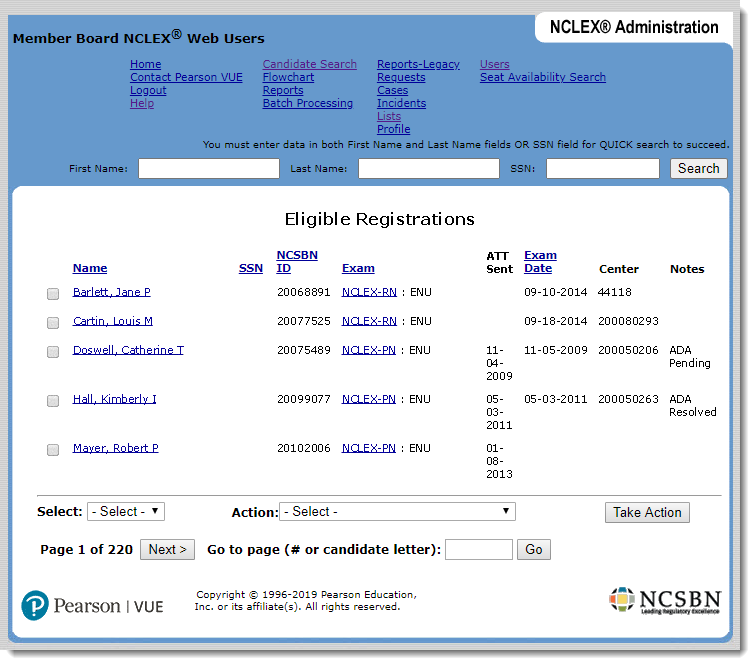
The columns display information about the candidate, including name, Social Security number (SSN), NCSBN ID number, exam type, date on which the ATT email was sent, exam date and testing center (if scheduled) and notes. In the Notes column, Retake appears if the candidate has registered to retake the same type of NCLEX exam, ADA Pending appears if the registration has one or more pending accommodations requests, and ADA Resolved appears if the registration has accommodations requests and none of them are pending.
- To view or edit a candidate’s information, select the candidate’s name in the Name column and make changes on the Candidate Details page.
- To view or edit a candidate’s registration information, select the exam type in the Exam column and make changes on the Registration Details page.
Pearson VUE Proprietary and Confidential